
Structure of the Internet: Protocols
Common Standard Protocols edit
With networks and the internet, we need to allow computers to talk to each other. To make sure that a computer talks to another in a way that the other understands, there are sets of rules governing modes of communication. These rules are called protocols. There are many different protocols out there, each defining rules for specific communication types.
Port numbers edit
When you send and receive data from a client or server, you will be sending lots of different types of data. To make sure that the data is dealt with by the correct program, for example a website request is dealt with by the web server, you need to add a port number. Each application will have a port number associated with it. For example a web server is port 80 and a game of doom is port 666.
Combining an IP address with a port gives us a socket. This is a direct connection to a process or application on a machine. The following example is connecting to a webserver on 203.43.12.234.
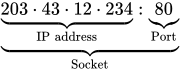
There are many well-known ports out there, here are a few of the ones you might need to know:
| Port number | Protocol that uses it |
|---|---|
| 20 | File Transfer Protocol (FTP) Data |
| 21 | File Transfer Protocol (FTP) Command |
| 25 | Simple Mail Transfer Protocol (SMTP) |
| 80 & 8080 | HyperText Transfer Protocol (HTTP) |
| 110 | Post Office Protocol v3 (POP3) |
| 143 | Internet Message Access Protocol (IMAP) |
| 443 | HyperText Transfer Protocol over SSL/TLS (HTTPS) |
| 666 | Doom Multiplayer game |
| 989 | Secure FTP (SFTP) |
| 22 | Secure Shell (SSH) |
| 23 | Telnet |
| 25565 | Minecraft Multiplayer Default Port |
| 27015 | Source Engine Multiplayer Default Port |
|
Exercise: Port Numbers What is a port number? Answer: A port number is an application or process specific communication endpoint attached to an IP address What is the port number that a web server would use? Answer: 80 & 8080 Combined, what is an IP and port number called? Answer: Socket What sort of servers are the following referencing:
Answer:
|
Non-secure protocols edit
Several of the protocols used to transmit data across networks (including the internet) are not secure. This means that if you are one of the routers that is used to get data from one host to another, you can read the data being sent, this technique is called packet sniffing. Normally this isn't a problem as the data being transmitted isn't secret but reading other people's packets without their permission is a crime in the UK.
FTP edit
File Transfer Protocol (FTP) is a standard network protocol used to copy a file from one host to another over a TCP/IP-based network, such as the Internet. FTP is built on a client-server architecture. FTP users may authenticate themselves using a clear-text (unencrypted) sign-in protocol but can connect anonymously if the server is configured to allow it. FTP works on port 21.

The first FTP client applications were interactive command-line tools, implementing standard commands and syntax. Graphical user interface clients have since been developed for many of the popular desktop operating systems in use today.
HTTP edit
The Hypertext Transfer Protocol (HTTP) is a networking protocol behind the World Wide Web. HTTP allows for transmission of Hypertext documents and web-pages. HTTP works on ports 80 and 8080.

Telnet edit
Telnet is a network protocol used on the Internet or a local area network to provide text-oriented communications between a server and remote clients. A client will connect to the server using a terminal (black and white command line console) and can then deliver commands to the server to perform things like remote software installation or system updates. Telnet works on several different ports.

Pros
 You can telnet from simple clients with inexpensive hardware
Cons
 Telnet doesn't allow you to use graphics Telnet can be insecure, most remote connections are now handled by SSH (Secure Shell)
POP3, SMTP edit
Simple Mail Transfer Protocol (SMTP) is an Internet standard for sending electronic mail (e-mail) across Internet Protocol (IP) networks. SMTP is specified for outgoing mail transport and uses TCP port 25. The protocol for receiving mail is called the Post Office Protocol v3 and it uses port 110.

Secure protocols edit
Sometimes we need to send data securely over networks. There are several protocols that allow you to do this. You can normally tell if a protocol is secure if it has the letter 'S' in its name. Examples include SSH, SFTP and HTTPS (SMTP is NOT secure!)
HTTPS edit
Hypertext Transfer Protocol Secure (HTTPS) is a combination of the Hypertext Transfer Protocol with the SSL/TLS protocol to provide encrypted communication and secure identification with a network web server.
HTTPS is often used when sensitive information is being sent over the internet, for example on internet banking webpages.
|
Exercise: Protocols What is a protocol? Answer: a set of rules which computers use to allow them to communicate with each other
Name the protocols used for the following:
Answer:
What does Telnet do, and when might it be unsuitable? Answer:
|